Some apps save incoming media to a phone’s shared storage, where it pops up in the gallery, whereas other apps… do something different. Snapchat gives users the option to save videos, which it can do to its own private app area, but it also allows media to be viewed only once then deleted, or for media only to be viewable in the app. This transient media is cached on the device, but in an annoying way that means that if forensic software providers don’t keep up to speed, forensic practitioners could be given the wrong impression that media is missing from their extraction.
Let’s get specific.
A video exists on a handset – you’ve seen it, you’ve played it, and its 8 seconds of footage will aid investigation and prosecution. You look through your extraction and find the video attached to the Snap… and it plays for about 0.3 seconds. Where’s the rest of it?
A full extraction of an iPhone will recover all files generated by Snapchat. These will be in the Applications folder, deep in the file system. Good forensic software should be able to jump to the video file you want straight from the message thread, else you’ll have to navigate down /private/var/mobile/….. all the way down to the app folder, which is named for the app GUID, then into the cache content folders. Pro tip: you’re looking for a folder with “SCContent” and “_3_” in its name. The file will likely be only a few kilobytes – hardly enough for that 8 seconds of video. Forensic software will categorise files, and this file should show in the Videos category, not because of its file extension (it doesn’t have one), but because of its header.
Snapchat videos are streamed to the device and cached in segments. When a message is initially received, the first few kilobytes are saved to the device. This is the file with the MP4 header, and this is the file that plays for 0.3 seconds. When the user views the video in the app, more is streamed and cached on the device. Crucially, the subsequent segments have no header and will not be categorised as videos.
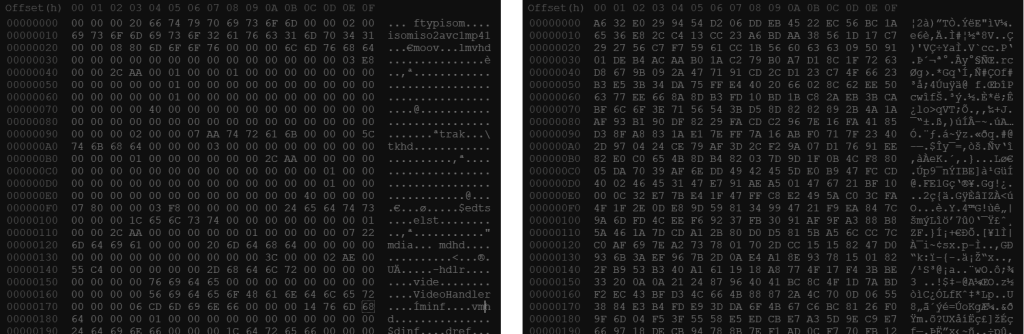
In the past, Facebook and Instagram have split streams into files with an .exo extension, but going further by splitting audio and video streams – thankfully this isn’t currently the case with Snapchat. These video segments are named in a helpful way too. The first video will be something like “85610365923519_0-128“, with following segments named with the same video ID and in 1kB or 2kB chunks, e.g. “85610365923519_128-1128“, “85610365923519_1128-2128“. Other initial ranges are possible, but all start at zero. It really is as simple as whacking them together (in order) – this can be done manually in a hex editor, done via the command line of any OS, done programmatically, or (with a little work) done within your favourite forensic analysis software. The stages I recommend are:
- Identify unique media IDs
- For each, confirm the first file header conforms to the MP4 standard
- Order the segments, including dummies (zeros) for any gaps
- Write combined data to a MemoryNode (or similar) in mobile forensic software
- Amend the Snap to contain a media link to this new file
- Output and store a list of modified/corrected data
Not all of these videos will be user-generated, but instead be ads – I’ve yet to find a way to differentiate between the two before reviewing them, though I’ve not delved deep into all of the databases. In addition, there will likely be several types of file in the same directory as these Snaps. These include:
- Image (JPG, PNG)
- Archive/container
- Config data/META data
I would also make a distinction within the MP4 category – different data between the MP4 sub-type atom and the following atoms which I think is a further definition of the codec, though I not an expert on the MP4 or MPEG specification. This can be seen in the second line of the MP4 header shown above. I will note I’ve observed that some forensic software has issues playing one or more sub-types, whereas I have not observed the issue with dedicated video tools such as VLC.
I don’t think there is anything worth remarking on when it comes to the images, but the archives and other data could be interesting. The name format for the images is currently only the media ID without and additional info following an underscore or dash. Files where the ID is followed by “_z[00000000000]” (and sometimes even without the “z”) are archives which may share an ID with a video. Again, no file extension is used. I have found these files can contain a thumbnail of the video and some meta data in JSON format – these are certainly unpacked by the tool I use primarily, though it’s not evident that the data within is parsed or whether its at all relevant.
TL;DR
Forensic software may not join multi-segment videos for review or reporting. Multi-segment videos can be identified by a naming convention. They can be combined by concatenating the files. Scripts or extensions will make this task much faster and much easier.
You don’t need to record the phone screen just to get that video.
 James G. Watson